 Advanced System Optimizer

 Registry Optimizers
Advanced System Optimizer / What makes Advanced System Optimizer the best PC Optimization tool?
What makes Advanced System Optimizer the best PC Optimization tool?
Scanning Modes

- Quick Scan - check 5 out of 7 common areas for errors responsible for slowing down PC performance.
- Deep Scan - perform a scan on all 7 areas to optimize performance, clean invalid registry entries, remove junk files, clean malware infections, wipe browser cache and cookies, defrag hard disk, optimize registry, and update outdated drivers. It is time-consuming and takes longer than a Quick Scan.
- Custom Scan - allows users to scan specific areas, which can take longer than Quick Scan.
Registry Optimizers

- Registry Cleaner -It safely cleans invalid and unwanted registry entries from the Windows Registry.
- Registry Optimizer -Removes gaps and fragments in the registry for faster PC startup and quick file access.
Disk Cleaner & Optimizers

- System Cleaner - It helps remove junk and other unwanted data from the system, cluttering precious disk space.
- Disk Optimizer - It defrags the hard disk for better storage and improved data access time.
- Disk Tools - It allows checking disks for errors, gives detailed information about the hard drive, shows disk temperature, and health, monitors read and write speed, and shows other important hard disk-related information.
- Disk Explorer - Get complete categorical detail of the existing files and folders saved on the disk at once. View the Top 100 files, see which file types take most of the disk space, and more.
PC Optimizers

- Game Optimizer - Play interference-free and optimized games on Windows.
- Memory Optimizer - It recovers memory within minutes without affecting system stability.
- Duplicate File Remover - It finds and removes duplicate files on the computer and frees valuable storage space.
Security & Privacy
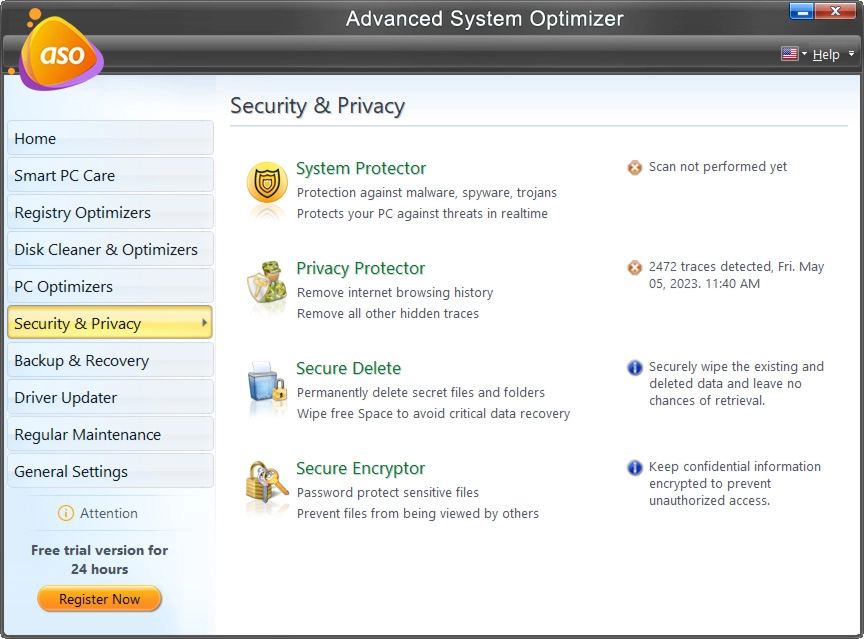
- System Protector - Keep the PC clean from viruses, malware, and other malicious threats.
- Privacy Protector - It erases all traces of Internet activities from the PC and helps maintain privacy.
- Secure Delete - It helps safely delete the data permanently, making data recovery impossible.
- Secure Encryptor - A simple utility that protects confidential and valuable data via password.
Backup & Recovery

- Undelete - Recover accidentally deleted data from hard disk and removable media.
- Backup Manager - It facilitates backups of important files and folders. (The feature is unavailable for Windows 10 & 11 os)
- System Files Backup and Restore - It takes a backup of system files and helps restore the system to any last known good configuration.
Driver Updater

- Driver Updater - Find outdated, missing drivers and update them to the latest version.
Common Issues Fixers

- PC Fixer - It provides a list of common problems with the necessary advice to enhance system performance.
- System and Security Advisor - Logically analyzes the system and gives performance and security-related tips.
Note: Common Issues Fixers feature is unavailable for Windows 10 & 11 os.
Regular Maintenance

- Startup Manager - It manages the programs that run at Windows startup.
- Uninstall Manager - Help uninstall programs completely without leaving traces behind.
- Scheduler - It helps automatically run tasks at predefined dates and times.
General Settings

Whether you want to run Advanced System Optimizer or System Protector on startup, check for weekly product updates (weekly), or fortnightly run Smart PC Care, you can customize the settings from here.