

Like others do you also use the same password for multiple websites. Or you use a password manager to generate and remember passwords. But now that there’s this thing called “passkeys” do you want to switch to it, but don’t know what it is?
If so, you are not alone. A lot of users are asking, “What are passkeys?” “Are Password Managers obsolete?” “Do we need to stop using passwords or Password Manager and move to passkeys?”
“What is the difference between passkeys and password managers”, “What to use and when”, “Can only one be used”, and “Does it work only with the phone?” All these and others will be answered in this post.
In short and simple words we can say, Passkeys are stronger than passwords but only websites like Google, Apple, Microsoft, PayPal, and a few others use it for now. Your banks, streaming service, and online shopping sites do not use it. This means they are not the replacements for passwords and if you try using them you might be locked out of most of the accounts.
You should not completely switch to passkeys as not all websites use them. For better security using both is better.
What’s the Difference between Passkey and Password Manager?
A password is something you decide and enter to secure your account like “Lucy123”, your birthdate, etc. Anyone with it can login to your account.
Resolve Windows 10 Login Problems in Minutes! 5 Ways
A passkey on the other hand is your fingerprint or face stored on your device. It cannot be typed and a website can’t steal it. It can only be unlocked with your fingerprint or face.
A Password Manager is a tool designed to save your passwords with a master password in an encrypted vault. When you use it to save passwords for websites, login details are auto filled when you visit that website. It works anywhere you install it, in your device and browser. It even helps to generate strong passwords. However, if you use a weak or same password it’s still vulnerable to breach. In contrast to this are passkeys. They are cryptographic tokens saved on your device, verified by your fingerprint or face. When you log in, your device approves “this is the person” without sharing the information. It keeps you secure from phishing attacks and can’t be stolen and each site has its own unique fingerprint. This means if one site is hacked others are not affected, which is not the case with the password. If you are using the same password on multiple websites and one is hacked others are also vulnerable.
Passwords travel across the internet whereas Passkeys stay locked on your device
Comparison – Passkeys vs Password Managers
| Passkeys | Password Managers |
| They are stored on device and are a combination of Biometric + private key | Stored in a secure encrypted vault and can be accessed with a Master password |
| More secure as the key never leaves the device. | Varies as if you login into a fake site the password is compromised. |
| Each passkey is unique | Reused passwords are a security risk |
| A backup method usually, email is required for recovery. | Passwords can be reset through a security question or link sent on email. |
| Only a handful of sites (10-15%) support it. | Can be used on every site. |
| Your device with biometric/PIN | Any browser or app |
Passkeys are stronger in cryptography while Password managers are more usable and widely used.
When You Actually Use Them
You should use passkeys on services supported by your device that you use regularly like email, banking, social media sites. While password managers can be used on sites not supporting passkeys like shopping, news, forums, streaming. Also, when working on a shared computer, building a recovery path and to manage and memorize passwords.
However, if you are looking for more security you should use both as they offer stronger security, keep you safe from phishing attacks and when everything is compatible with passkeys you won’t have to set up anything from scratch.
Why People Don’t Use Passkeys Yet
If passkeys offer so much security why don’t people and every app use them?
- Passkeys can be recovered via email – Most passkeys are set to recovery by email. This means when the device is lost it can be recovered via email which is scary because if email is compromised then the key is too.
- Syncing doesn’t always work – setting up passkeys on different devices can be tricky because things don’t always sync seamlessly. On Apple devices they work via Cloud, and across Android/Chrome/Windows via Google Password Manager. This means if you have both the devices you will need to switch between multiple systems to sync and keep it working.
- Banks don’t support them – Till date banks have not moved to passkeys and it is one place that no one wants to be locked out of. Therefore until banks start using passkeys, password managers are the security layer you have to use.
- Most people don’t understand them – To use passkeys one needs to understand privacy and encryption practices that not everyone can understand. Therefore passkeys are only for a handful of people whereas password managers can be used by everyone else.
Why Do People get Confused Between Passkeys and Passwords?
Windows Hello is behind this confusion. It is one feature that performs two separate jobs by mixing them, thus creating confusion.
Job 1: Unlocking your PC – To sign-into Windows 11 and 10 when you set up fingerprint, face, or PIN, Windows Hello logs you into your computer without creating a passkey for Google, bank, Apple or any other thing and it has nothing to do with any website. It is a simple replacement for typing your Windows password.
Job 2: Logging into websites – Although Windows Hello creates a passkey to help you login to your PC when you visit a website that accepts passkeys you will have to create one separately because enabling Windows Hello for your PC does not automatically create passkeys anywhere else.
This means when you enable Windows Hello you can unlock your PC without a password but you can’t login websites via it. You will have to set up a passkey on each supporting site individually, or use a password manager for everything else.
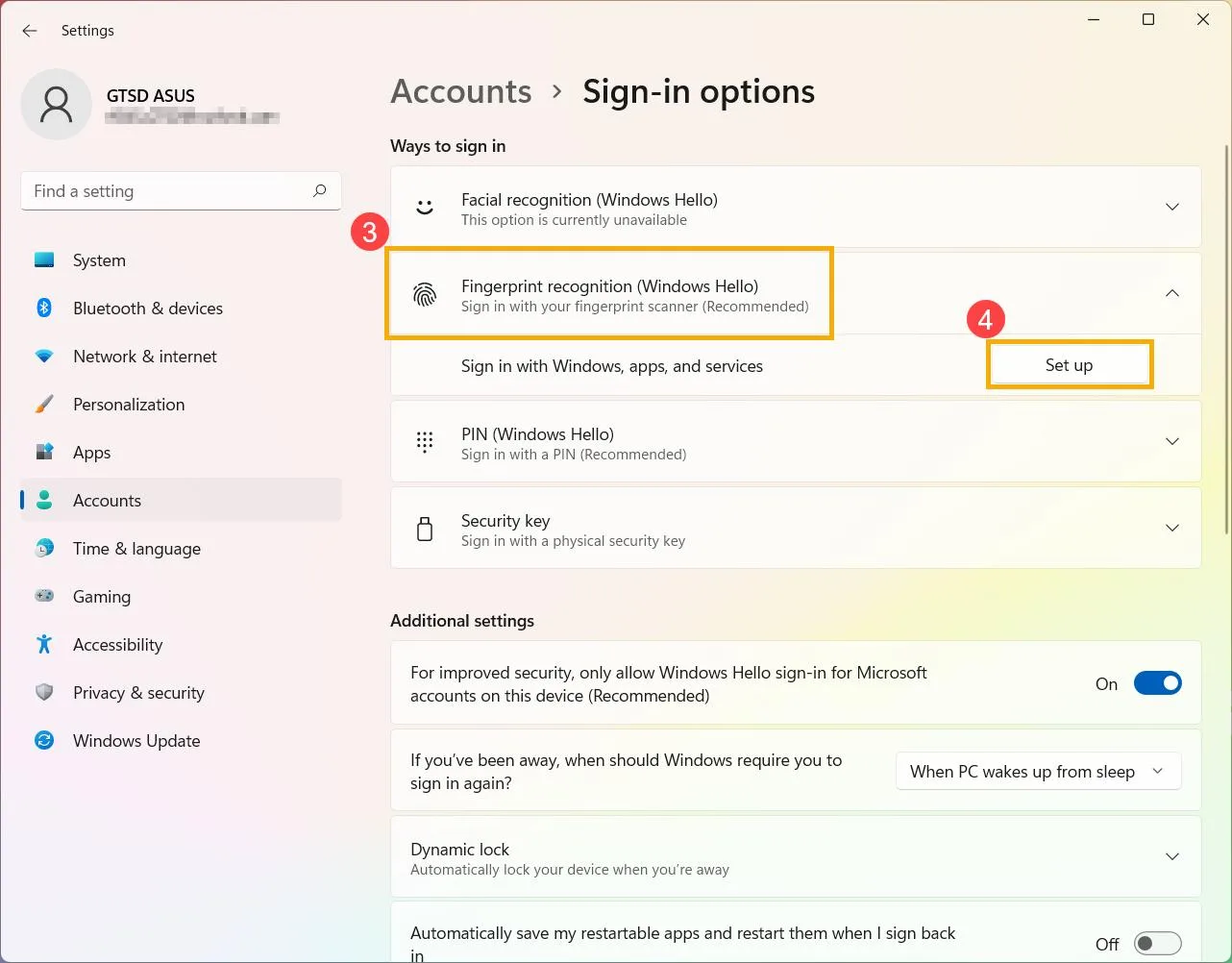
To enable Windows Hello (PC unlock only): Go to Windows Settings > Accounts > Sign-in options > Windows Hello > choose Fingerprint or Face > Setup.
Common Mistakes People Make
- Deleting password manager after setting up one passkey without realizing passkeys are not universally accepted. This means they will be able to login to Google, Apple, Paypal but not the other sites that don’t accept passkeys.
- Users set up a passkey without a recovery method as they don’t realize that if they lose their phone and there is no other way to recover the passkey they will be locked out.
- Assuming all websites accept passkeys without realizing only Google, Apple, Microsoft, and PayPal support passkeys.
- Using the same email for password and passkey recovery without realizing if the email is compromised, both passwords and passkeys are at risk.
How To Change Windows 11 Account Password
Frequently Asked Questions
Passkeys vs Password Managers – Which is Stronger?
Theoretically passkeys are stronger as they are locked on your device and each passkey is unique but if the recovery method is compromised they are as vulnerable as password managers. Therefore, it will be right to say that the strength of a security measure depends on how it is used and how it will be recovered. Moreover, like passwords, passkeys are not universal, they cannot be used everywhere and if a site does not accept a passkey and you don’t have a password then you will be locked out.
Also when passkey recovery is set via email the phishing-resistance angle is defeated.
Hence, there is no sure shot way to say which is stronger. But, yes when you use both an additional layer of security is created that helps keep your data, account and system protected.