
Manor Lords – Does the startup crash, game stopped working, bother you? Here’s how you can fix it.
The game has a massive fanbase, and it offers a town simulation with a good mix of real-time strategy. Still, issues like crashing on launch are very common.
If your screen goes black and no matter how many times you click launch game, the game closes instantly, or nothing happens, use these simple fixes.
Why does Manor Lords Crash on Startup?
Below is the list of the most common reasons behind Manor Lords crashing the moment you hit “Play” or not even opening at all:
1. Outdated or Corrupt Graphics Drivers
GPU is an important part of your PC, especially when you are playing a game like Manor Lords that demands high graphics requirements. So if the graphics drivers are outdated or damaged, the system may slow down when loading the game’s graphics. This will result in a random crash at game startup.
2. Missing or Corrupted Game Files
At times, when you are downloading Manor Lords, if your internet connection is unstable, your system might have missing or corrupted files. A single missing file might cause your system to crash or fail to work at all. Generally, Steam will catch these issues. However, errors can happen.
3. Your System Does not Meet the Minimum Requirements
Manor Lords is a game that looks great but needs a strong system for your PC. If you don’t meet the minimum required specs, then there is a chance you will crash on start. Think of it like trying to stream a 4K movie over a slow internet connection, the experience will not be pleasing.
4. Security Program Blocking the Game
Your Windows Defender or antivirus software could mistakenly block part of the game during or after the installation, considering it malware. This mostly happens in the background quietly, and could be why your game, Manor Lords, does not start.
5. Conflicts with Background Programs or Overlays
If you have some other programs running, like Discord, MSI Afterburner, or even some screen recording programs, during the time you open the game. They may interfere with the game’s startup. These programs may interfere with the game’s full-screen settings or even with the audio/video.
6. Windows or DirectX Issues
Sometimes the problem lies with the Windows Configuration and not with the game. Outdated DirectX, uninstalled updates, or corrupted system files stop the new installation of games from working properly.
7. Incompatible Display Settings or Resolutions
Sometimes, Manor Lords tries to open in a display resolution that the monitor does not support. If you are working on a multiple monitor setup or ultra wide monitors, the game will crash even if the whole system is working fine.
8. Mod or Third-Party Tool Conflicts
If you’ve installed mods or tried to adjust the game using third-party tools right after your Manor Lords download. There’s a chance these changes are clashing with the base game files, leading to a crash on startup.
Fixes for Manor Lords crashing on Startup
If you are unable to progress beyond the loading screen, and Manor Lords is crashing right after being launched, you’re not alone! There are many users who are facing the issue of Manor Lords stopping right after opening the game. This can happen because of hardware or software issues. But do not worry, the following are the easy fixes to start your Manor Lords and make it run smoothly again.
1. Check Minimum System Requirements
First and most basic step to fix this issue of Manor Lords crashing on Startup is to check if the PC fulfills the minimum system requirements. Manor Lords is a game that requires high graphics. Make sure that you have sufficient hardware and memory. Otherwise, Manor Lords will crash on Startup.
Minimum System Requirements:
OS: Windows 10/11 (64-bit)
Processor: Intel i5-4590 / AMD FX-8350 or better
RAM: 8GB
Graphics: GTX 1050 Ti / Radeon RX 570
Storage: Minimum 16 GB of free space
2. Update Your Drivers
Outdated or corrupted Graphics Drivers are the most common reasons for Manor Lords crashing on Startup. So, whether you are using NVIDIA, AMD, or Intel Graphics, make sure you get the latest version of all.
How to update graphics drivers the easy way:
Make use of a 3rd party application such as Advanced Driver Updater by Systweak Software to update your graphics drivers. This will not only save you from user error in updating your graphics drivers but will also update your entire Operating System to the latest version. Along with your graphics drivers to support the game Manor Lords.

3. Run Game as Administrator
Sometimes, the lack of permissions is what stops Manor Lords from launching. Just launching the game as an admin can fix that.
Steps:
1. Right-click desktop icon or .exe file Manor Lords.
2. Select Properties > Compatibility.
3. Check: Run this program as an administrator.
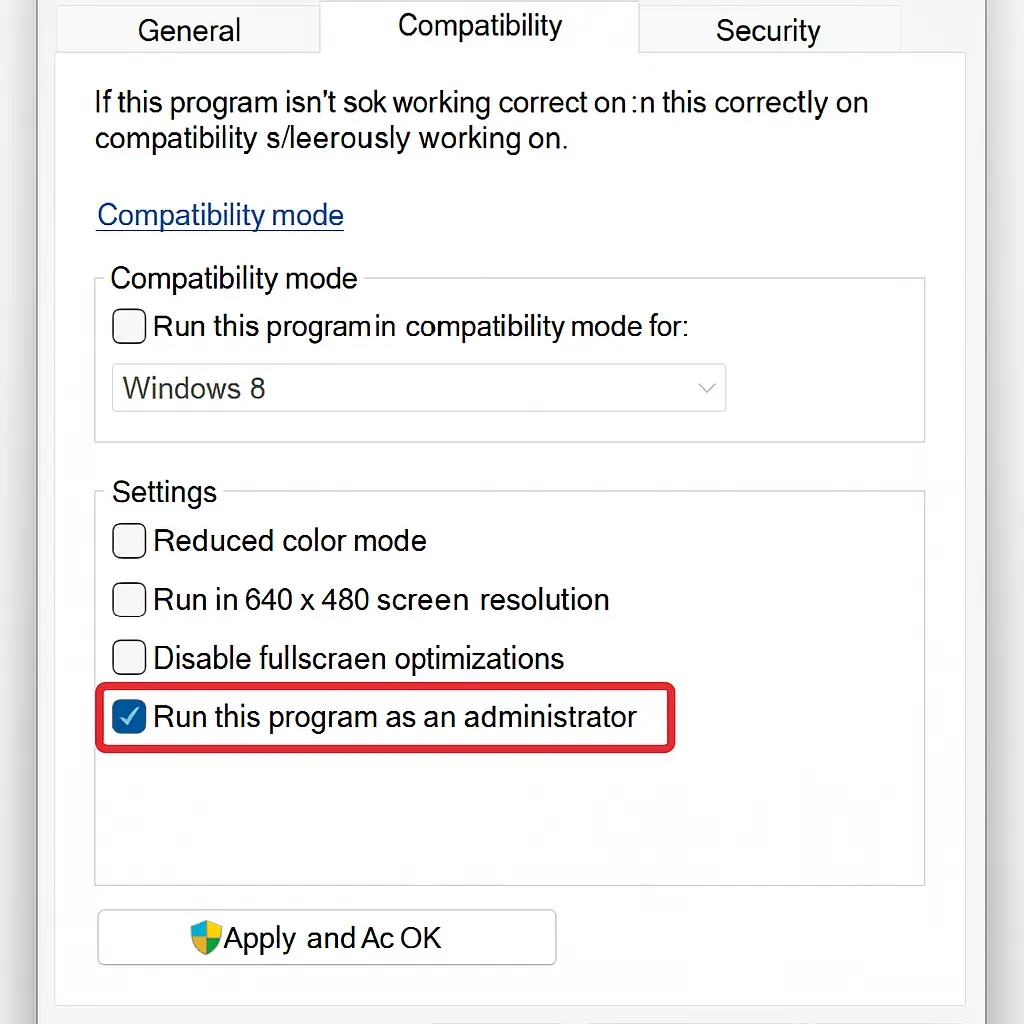
4. Click Apply.
4. Disable Overlays (Steam, Discord, NVIDIA, etc.)
In-game overlays can enhance gameplay. However, they can also cause games to freeze or crash. If your game is crashing after launching Manor Lords, you may want to consider disabling all in-game overlays before restarting the game.
How to disable Steam Overlay:
1. Open Steam > Library > right-click Manor Lords > Properties > General
2. Turn off Enable the Steam Overlay while in-game
3. Do the same steps for Discord, NVIDIA GeForce Experience, and other overlays.
5. Verify Game Files (Steam)
Sometimes, the game’s downloaded files may be corrupted or incomplete, which causes crashing on startup. Fortunately, Steam provides the ability to check your game files and repair them easily.
Instructions:
1. Open Steam and open your Library.
2. Right-click Manor Lords > Properties.
3. Select Installed Files.
4. Click Verify integrity of game files.
5. Steam will scan and download the corrupted files again.
6. Temporarily Disable Antivirus or Firewall
Sometimes, antivirus programs may mistakenly treat Manor Lords as harmful. This is especially true during startup, as that is when most antivirus software scans may run.
To test:
1. Temporarily disable your antivirus and Windows Firewall.
2. Open the game.
Note : Turn off antivirus temporarily for testing purposes alone. Make sure the Manor Lords installation is always official.
7. Update DirectX and Visual C++ Redistributables
Missing or outdated DirectX and Microsoft Visual C++ components will cause the game to crash on startup.
Fix it by:
1. Downloading the latest DirectX Runtime.
2. Installing the latest Visual C++ Redistributables.
8. Modify Graphics Settings Before Launch
If Manor Lords is too demanding at startup, try adjusting launch settings:
1. Open Steam > Library > Right-click Manor Lords > Properties.
2. In Launch Options, enter:
-windowed -noborder -low
This forces the game to start in window, low-resource mode, often bypassing crashes caused by resolution or GPU stress.
9. Reinstall the Game
If you’ve tried everything and Manor Lords still won’t load. A clean reinstall might be your last option to fix the issue.
Steps:
1: Uninstall the game from Steam.
2: Delete any other remaining Manor Lords folders in C:\Program Files (x86)\Steam\steamapps\common\
3: Reinstall the game on Steam.
Make sure your download is not disturbed, and your device has enough free space.
10. Wait for a Patch or Hotfix
Manor Lords is still in the development process, and it is updated regularly. So the startup crashes can be because of already existing issues that the game has. Keep updated by the game developers on Steam and through social media to know about patches or hotfixes.
Bonus Tips to Avoid Such Crashes in the Future
Keeping the following tips while starting Manor Lords will help you in preventing crashing problems in the future and will make your gaming experience great:
1. Keep Drivers Updated Regularly: Old drivers will result in crashes upon startup of Manor Lords. Use software such as Advanced Driver Updater to regularly update system and GPU drivers.
2. Enable Automatic Game Updates: Make sure Steam is allowed to auto-update Manor Lords. Coders update the game with performance optimizations and fixes for known crash issues regularly.
3. Close Background Programs: Close the background running programs that are not required before launching Manor Lords. As they take up a lot of memory like Chrome, Discord, etc.
4. Use a Stable Internet Connection: Manor Lords is mostly offline, launching, validating, or syncing will need internet connectivity. A connection problem can result in hang-ups or the failure of launch.
5. Avoid Using Mods: Mods will clash with game files, especially while in development. If a mod is officially supported or has good community ratings, then it is good to use mods, but if it is not, then wait for the original releases.
6. Occasional PC Maintenance: Scan for viruses, clear out temporary files, and update the softwares ike DirectX and Visual C++.
7. Keep Your System Cool and Healthy: Random crashes are due to overheating or excessive hardware use. Look for the temperature with programs like HWMonitor and keep your PC within safe ranges.
8. Place Games on an SSD if Possible: SSDs are great in stability and provide better load times, so if your Manor Lords are on older HDD, try to move it to an SSD. This will reduce the crashing at startup problems.
Final Words
Crashing problems can transform the enjoyment of Manor Lords gameplay into frustration, particularly if the game does not launch. Whether the crashes happen the moment after your download Manor Lords or at random after days of good play. The solutions and suggestions we’ve listed here should fix the problem of sudden crashes at startup.
To help avoid future issues, every step from updating drivers, checking game files, and changing your game launch settings is necessary. If you can keep these additional tips in your memory, then you will be in a better position to avoid having these issues arise again and therefore be able to concentrate fully on your goals within Manor Lords.
With that loaded advice, now go construct your medieval legacy in Manor Lords crash-free!
Frequently Asked Questions
Recommended : How to Fix Computer Suddenly Restarts While Playing Games (not Overheating)